
 admin
admin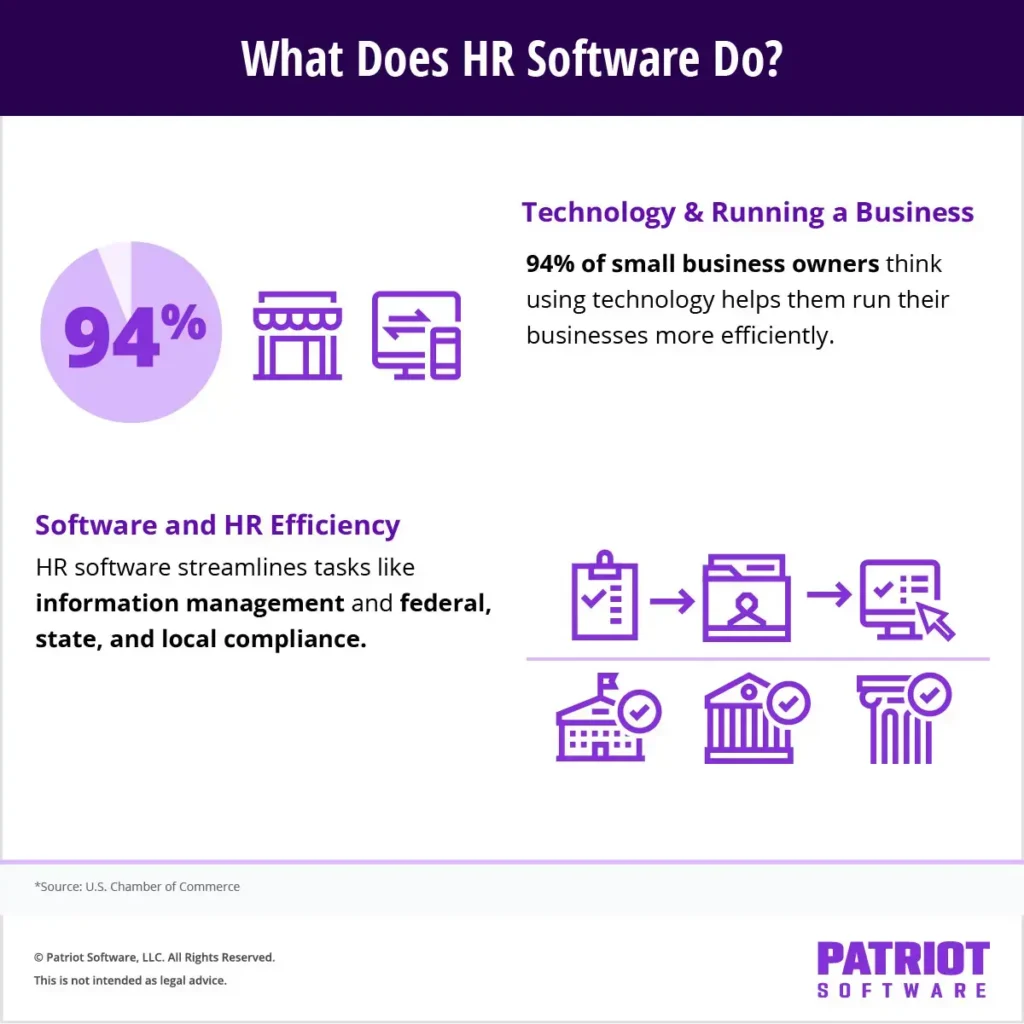
The landscape of human resources has dramatically shifted, posing unique challenges for small businesses striving to remain competitive, compliant, and efficient. In this evolving environment, the question of whether HR software is a worthwhile investment for small and medium-sized enterprises (SMBs) has moved from a speculative inquiry to a critical strategic consideration. Businesses are increasingly seeking robust solutions to streamline HR tasks, manage intricate compliance requirements, optimize reporting, and centralize employee information. This comprehensive overview delves into the core functionalities, strategic advantages, and crucial decision-making criteria for adopting HR systems tailored for the small business sector.
Understanding the Evolution and Essence of HR Software
At its core, Human Resources (HR) encompasses a vast array of critical business functions: talent acquisition, policy development, employee onboarding, compensation and benefits administration, performance management, and, crucially, labor law compliance and meticulous recordkeeping. Historically, these tasks were often manual, paper-intensive, and prone to human error, especially in smaller organizations where dedicated HR departments might be nascent or non-existent.
HR software, or Human Resources Information Systems (HRIS), represents a technological leap designed to automate and centralize these processes. It provides a structured, digital framework for managing the entire employee lifecycle, from initial recruitment to offboarding. For SMBs, where resources are often stretched thin, the promise of HR software lies in its ability to significantly improve operational efficiency, enhance employee satisfaction through streamlined processes, foster better workflows, and, perhaps most importantly, ensure unwavering compliance with an ever-expanding web of federal, state, and local regulations.
According to a study by the U.S. Chamber of Commerce, a remarkable 94% of small business owners acknowledge that leveraging technology platforms, including HR software, is instrumental in operating their businesses more efficiently. This statistic underscores a broad recognition within the SMB community of technology’s transformative potential. In many small business contexts, HR software is not a standalone solution but is frequently bundled with online payroll services into a single, integrated platform. This integration offers a unified self-service experience for employees and creates a seamless flow of data between critical administrative functions, mitigating data duplication and inconsistencies.
The transition from manual HR processes to digital solutions is not merely about convenience; it’s a strategic imperative. The past decade has seen a proliferation of employment laws, from changes in minimum wage and overtime rules to new mandates regarding paid leave, data privacy, and anti-discrimination policies. Navigating this complexity without a systematic approach exposes SMBs to significant risks, including costly fines, legal disputes, and reputational damage. HR software acts as a digital guardian, providing tools and alerts to help businesses stay ahead of these regulatory demands.
The Multifaceted Role of HR Software in Small Business Operations
So, what precisely does HR software for small businesses do, and how can its features translate into tangible benefits for your organization? The capabilities of modern HR software extend far beyond simple record-keeping, offering a suite of tools designed to professionalize HR operations.
-
Centralized Employee Information Management:
One of the most immediate benefits of HR software is the eradication of cumbersome paper files. When managing employees, businesses accumulate a vast amount of documentation, from company-wide policies like employee handbooks to individual records such as performance reviews, offer letters, and tax forms. HR software digitizes and centralizes this information, allowing for secure, paperless management of all employee-related documents online. This not only declutters physical workspaces but also significantly improves accessibility and data security.
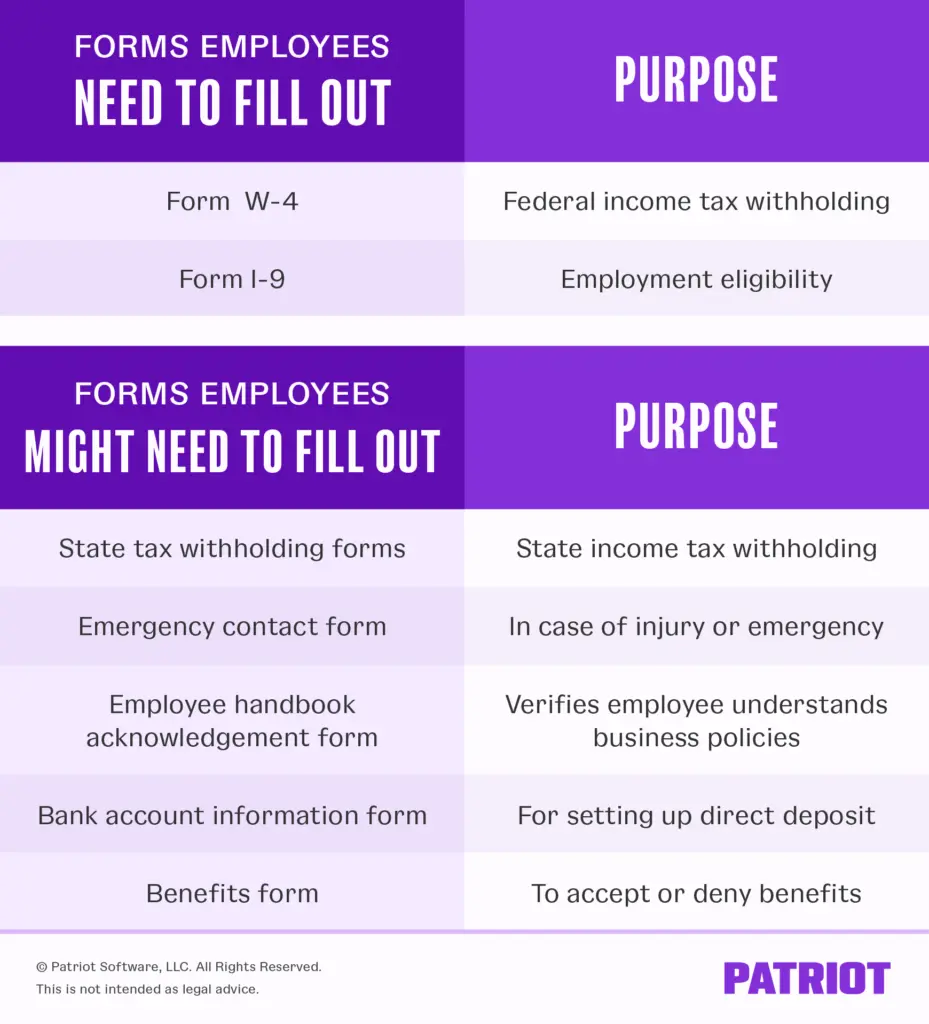
Examples of critical HR documents and data points seamlessly stored include:- Employee contact information and emergency contacts
- Job descriptions and compensation history
- Performance reviews and disciplinary actions
- Training records and certifications
- Onboarding documents (e.g., I-9s, W-4s, state tax forms)
- Benefits enrollment forms
- Signed policy acknowledgments
- Direct deposit information
- Termination documents
Depending on the sophistication of the software, users can also add notes, set reminders for document expiry, and track version histories, ensuring comprehensive and audit-ready records.
-
Robust HR Document Templates and Policy Management:
Developing legally sound and comprehensive HR policies and forms from scratch is a time-consuming and often daunting task for small business owners. Many HR software solutions alleviate this burden by providing access to a library of professionally drafted HR document templates. These templates can cover a wide range of topics, including employee conduct, anti-discrimination policies, equal employment opportunity statements, leave policies, and more. This feature not only saves valuable time but also helps ensure that policies are current and legally compliant, reducing the risk of errors or omissions that could lead to legal challenges.
Common HR document templates often include:- Offer letters and employment agreements
- Performance review forms
- Disciplinary action notices
- Leave request forms (e.g., FMLA, sick leave)
- Non-disclosure agreements (NDAs)
- Employee separation agreements
- Harassment prevention policies
Beyond standard templates, some systems assist in creating complex benefits documents, such as Premium Only Plans (POP) or COBRA notices, further simplifying administrative overhead.
-
Comprehensive Compliance Tracking and Alerts:
Compliance with federal, state, and local labor laws is non-negotiable but notoriously challenging due to the dynamic nature of regulations. Small businesses, in particular, often lack the dedicated legal counsel or HR teams found in larger corporations, making them vulnerable to compliance missteps. HR software acts as a proactive tool to help businesses stay compliant.
Key compliance features typically include:- Automated alerts for changes in labor laws that impact the business (e.g., minimum wage adjustments, new leave laws).
- Tracking of mandatory training completion (e.g., harassment prevention).
- Guidance on required employee postings.
- Verification of I-9 compliance.
- Support for EEO-1 reporting and other governmental filings.
- Maintenance of audit trails for policy acknowledgments and training records.
The integration of compliance tools can significantly mitigate the risk of fines and legal action, providing peace of mind to business owners.
-
Actionable HR Reports and Analytics:
Gaining insights into HR-related data is crucial for strategic decision-making and mandatory reporting. HR software consolidates all relevant data into easily digestible reports, eliminating the need to manually sift through disparate records. This feature transforms raw data into actionable intelligence, simplifying mandatory reporting obligations and informing business strategy.
Examples of valuable HR reports include:- Employee demographics (age, gender, ethnicity)
- New hire reports for state agencies
- Turnover rates and reasons for departure
- Time-off accrual and usage
- Compensation analysis
- Training completion rates
These reports can be generated, filtered, and exported, providing a clear snapshot of the workforce and aiding in critical analyses, such as identifying retention issues or diversity metrics.
-
Integrated Learning Management System (LMS):
Employee training and development are vital for skill enhancement, compliance, and fostering a positive workplace culture. Some HR software systems incorporate a Learning Management System (LMS), enabling businesses to assign, track, and schedule employee training programs directly within the HR platform. This can include both in-house developed materials and access to a library of pre-built courses.
LMS capabilities are particularly useful for:- Mandatory compliance training (e.g., sexual harassment prevention, data security).
- Onboarding new employees with company policies and procedures.
- Skill development courses relevant to job roles.
- Leadership and management training.
- Safety training.
An integrated LMS ensures that training records are automatically updated in employee profiles, simplifying audits and demonstrating due diligence.
-
Employee Handbook Builder:
An employee handbook is a cornerstone of any well-run business, outlining expectations, policies, and procedures. However, creating and regularly updating a legally compliant handbook can be complex. Many HR systems now offer an employee handbook builder tool, featuring customizable templates, state-specific policy variations, and automatic updates to reflect changes in labor law. While standalone handbook builders can be expensive, their inclusion in an HR software package adds significant value by providing a comprehensive, legally sound document that protects both the employer and the employee. -
Manager Designations and Granular Permissions:
As small businesses grow, delegation becomes essential. HR software facilitates this by allowing employers to designate managers and assign direct reports within the system. This enables managers to view and manage their team’s information, such as time-off requests, performance data, or contact details, in one centralized location. Crucially, the system allows for granular control over permissions, ensuring that managers only access information relevant to their role and direct reports (e.g., contact information but not sensitive payroll data), thereby upholding data privacy and security protocols. This empowers managers while maintaining centralized control and data integrity. -
Streamlined Benefits Administration:
Offering competitive employee benefits, such as health insurance, 401(k) plans, or group-term life insurance, is a key strategy for attracting and retaining talent. However, administering these benefits can be complex, involving enrollment, contribution tracking, and remittance to various agencies. HR software can significantly streamline benefits administration, from setting up employee benefits packages to managing employee elections, calculating withholdings, and ensuring timely payments to providers. This reduces administrative burden and minimizes errors in what is often a critical, yet intricate, area of HR.
The Power of Integration: Why HR + Payroll is a Game Changer
The synergy between HR and payroll functions is profound, making integrated platforms a preferred choice for many small businesses. When HR and payroll operate as separate, disconnected systems, businesses face a host of inefficiencies and risks:
- Data Duplication and Inconsistency: Information entered into one system must be manually re-entered into another, leading to errors and outdated records.
- Administrative Burden: Managing two separate systems doubles the effort for updates, reporting, and troubleshooting.
- Compliance Gaps: Discrepancies between HR records (e.g., new hires, terminations, pay rate changes) and payroll can lead to incorrect tax calculations, missed filings, and compliance penalties.
- Poor Employee Experience: Employees may have to navigate multiple portals for different tasks (e.g., one for pay stubs, another for benefits enrollment).
An integrated HR and payroll platform resolves these issues by:
- Centralizing Employee Data: A single employee record serves both HR and payroll, ensuring consistency and accuracy across all functions.
- Automating Data Flow: Changes made in HR (e.g., new hires, pay raises, benefits enrollment) automatically update payroll, reducing manual intervention and errors.
- Streamlined Compliance: Payroll tax calculations, filings, and reporting are seamlessly integrated with HR data, ensuring accuracy and timeliness.
- Enhanced Employee Self-Service: Employees access a single portal for viewing pay stubs, W-2s, updating personal information, enrolling in benefits, and requesting time off, improving their overall experience and reducing inquiries to HR.
- Comprehensive Reporting: Integrated systems provide holistic reports that combine HR and payroll data, offering deeper insights into labor costs, turnover, and other key metrics.
Strategic Considerations for Choosing HR Software
Selecting the right HR software is a pivotal decision for small businesses. A careful evaluation process is essential to ensure the chosen solution aligns with specific needs and growth trajectories. Key decision criteria include:

- Core Features and Functionality: Evaluate if the software offers the specific tools needed (e.g., advanced reporting, specific compliance features, LMS, benefits administration). Prioritize based on current pain points and future growth plans.
- Scalability: Can the software grow with your business? As your employee count increases or your HR needs become more complex, will the system still be able to support you without requiring a complete overhaul?
- Ease of Use and User Interface (UI): A cluttered or complex interface will deter adoption. Opt for intuitive, user-friendly software that requires minimal training for both administrators and employees.
- Integration Capabilities: Beyond HR and payroll, consider if the software integrates with other essential business tools like accounting software, time and attendance systems, or applicant tracking systems (ATS).
- Security and Data Privacy: HR software handles highly sensitive employee data. Ensure the vendor employs robust security measures, including encryption, multi-factor authentication, and adherence to data privacy regulations (e.g., GDPR, CCPA).
- Customer Support: Responsive and knowledgeable customer support is crucial, especially for SMBs that may not have dedicated IT or HR staff. Look for vendors offering various support channels (phone, email, chat) and a strong knowledge base.
- Cost and Pricing Model: Understand the total cost of ownership, including subscription fees, implementation costs, and any add-on charges. Compare pricing models (per-employee-per-month, tiered) and ensure transparency.
- Vendor Reputation and Reviews: Research the vendor’s track record, read customer reviews, and look for case studies from businesses similar to yours.
- Mobile Accessibility: In today’s mobile-first world, access to HR functions via mobile devices (for both employees and managers) can significantly enhance convenience and efficiency.
A Quick Implementation Checklist for Smooth Adoption
Once a decision is made, a structured implementation process is key to maximizing the return on investment.
- Data Gathering and Preparation: Collect all necessary employee data, company policies, and historical records. Cleanse data to ensure accuracy before migration.
- System Configuration: Set up company-specific settings, payroll parameters, benefits plans, and user permissions.
- Employee Data Import: Import employee information, ensuring all fields are correctly mapped from old systems or spreadsheets.
- Document Upload: Upload critical employee documents and company policies into the digital repository.
- Policy and Handbook Review: Customize and finalize policy templates and the employee handbook within the system.
- Training and Onboarding: Provide comprehensive training for administrators, managers, and employees on how to use the new system.
- Self-Service Enablement: Activate employee self-service features, communicating clearly how employees can access their information and perform tasks.
- Compliance Alerts Configuration: Set up and test compliance alerts and reporting schedules.
- Trial Run and Validation: Conduct a trial run (if possible, using a sandbox environment) to validate workflows and data accuracy before full rollout.
- Ongoing Review and Optimization: Regularly review system usage, gather feedback, and optimize settings to ensure continuous improvement.
Cost, ROI, and Justifying the Investment
The initial thought of adding another subscription service can be daunting for small business owners. However, the cost of HR software must be weighed against its significant Return on Investment (ROI). While prices vary widely based on features and the number of employees, most solutions for SMBs are structured with per-employee-per-month pricing, making them scalable.
The ROI of HR software is often realized through:
- Time Savings: Automating administrative tasks frees up owners, managers, or HR personnel to focus on strategic initiatives rather than transactional work. Studies often cite significant reductions in time spent on payroll, onboarding, and record-keeping.
- Reduced Compliance Risk: Avoiding costly fines, legal fees, and penalties associated with non-compliance can translate into substantial savings.
- Improved Efficiency: Streamlined workflows and reduced manual errors lead to greater accuracy and productivity.
- Enhanced Employee Retention: Better benefits administration, clear communication via self-service portals, and effective performance management contribute to higher employee satisfaction and lower turnover, which can be extremely expensive.
- Better Data for Decision-Making: Access to comprehensive HR reports allows for data-driven decisions regarding staffing, compensation, and training, optimizing resource allocation.
- Reduced Paperwork and Storage Costs: Moving to a paperless system eliminates costs associated with printing, filing, and physical storage.
When Does HR Software Become Indispensable for a Small Business?
The question of "do I need HR software?" often arises as a business scales. While there’s no magic number, several triggers indicate that HR software is moving from a "nice-to-have" to a "must-have":
- Five or More Employees: As the team grows beyond a handful, manual processes become unsustainable and prone to error.
- Multi-State Hiring: Managing compliance across different state regulations becomes incredibly complex without automated support.
- Offering Employee Benefits: The administration of health insurance, retirement plans, and other benefits necessitates a structured system.
- Seasonal or Rapid Growth: Businesses with fluctuating employee numbers or experiencing rapid expansion require flexible and scalable HR management.
- Increasing Compliance Concerns: When new laws or regulations frequently impact your industry or location, automated compliance tracking becomes critical.
- Excessive Time Spent on Manual Tasks: If owners or managers are dedicating significant hours each week to paperwork, reporting, and basic HR inquiries, it’s a clear signal for automation.
- Desire for Improved Employee Experience: To attract and retain talent, offering a modern, self-service HR experience is increasingly important.
Many HR software providers, including some like Patriot Software, offer free trials, allowing businesses to test the platform’s features and evaluate its suitability before committing to a purchase. This risk-free approach can be invaluable in making an informed decision.
The Future Landscape of HR Software for SMBs
The evolution of HR software is ongoing, with emerging trends promising even greater efficiencies and strategic insights for small businesses. Artificial intelligence (AI) and machine learning are beginning to play a role in automating routine tasks, such as answering common employee questions, analyzing turnover predictions, and even assisting with talent acquisition. Advanced analytics are moving beyond basic reporting to offer predictive insights into workforce trends. Mobile-first design continues to be a priority, ensuring HR functionalities are accessible anytime, anywhere. Furthermore, the focus on personalized employee experiences and mental wellness support is leading to more holistic HR platforms that address the broader needs of the modern workforce. These advancements suggest that HR software will only become more integrated and indispensable for SMBs aiming to thrive in an increasingly complex and competitive business environment.
Conclusion
In an era defined by rapid change, heightened regulatory scrutiny, and a competitive talent market, HR software is no longer a luxury but a strategic necessity for small businesses. It provides the technological backbone required to navigate the complexities of employee management, ensure compliance, and free up valuable resources for growth and innovation. By centralizing data, automating processes, and providing actionable insights, HR software empowers SMBs to professionalize their HR functions, mitigate risks, and foster a more engaged and productive workforce, ultimately contributing to sustained business success.
FAQs
What does HR software do for a small business?
HR software centralizes employee records, stores documents digitally, provides compliant templates, tracks compliance tasks and alerts, generates essential HR reports (e.g., demographics, new hires), manages manager permissions, supports employee handbook creation, and helps administer employee benefits efficiently.
How does HR software integrate with payroll?
Integrated platforms ensure a single, consistent employee record across both HR and payroll, automating data flow for tasks like tax calculations and filings. This integration also provides employees with one unified self-service portal for all their HR and payroll needs, reducing errors and administrative burden.
When should a small business get HR software?
Common triggers for adopting HR software include reaching approximately five or more employees, hiring across multiple states, offering employee benefits, experiencing seasonal spikes or rapid growth, facing increasing compliance complexities, or spending an excessive amount of time on manual HR paperwork and reporting.
What HR documents should I store in the system?
Key documents to store include employee handbooks, signed policy acknowledgments, performance reviews, job and pay history records, emergency contacts, benefits enrollment forms, training acknowledgments, offer letters, W-4s, and I-9s.
Is a learning management system (LMS) included with HR software?
Some HR platforms integrate a built-in LMS, offering features to assign and track employee training, and sometimes include pre-built courses (e.g., harassment prevention). Others offer seamless integrations with third-party learning tools. It’s important to check the specific vendor’s offerings.
Can HR software help with EEO-1 and new hire reporting?
Yes. HR software significantly aids in these processes by consolidating relevant employee data into dedicated demographic and new hire reports, which can then be used to complete EEO-1 filings and state new hire reporting requirements faster and more accurately.
How secure is HR software for sensitive data?
Reputable HR software providers prioritize data security, employing robust measures such as data encryption, granular user permissions, multi-factor authentication, and regular security audits. It’s crucial to select a vendor with a strong commitment to data privacy and security, and to limit manager access to "need-to-know" information using role-based permissions.
How do I switch from spreadsheets or manual processes to HR software?
The transition typically involves gathering and cleaning all existing EIN and employee data, configuring payroll and access permissions within the new system, importing employee records, uploading digital documents, enabling employee self-service features, and setting up compliance alerts. Utilizing a free trial period to validate your specific workflows and data migration is highly recommended.
This article has been updated from its original publication date of August 29, 2024. This is not intended as legal advice; for more information, please consult a qualified legal professional.